
How I Consolidated Judge.me Reviews Across 3,000+ Variants
A Shopify migration note on consolidating 2,600+ scattered product reviews across 450+ style-code parents without relying on product groups.
A client came to me with a review problem that looked simple on the surface and turned into one of the more satisfying data puzzles I have solved this year.
Here is the setup.
The Problem
The store did not sell products the way most Shopify stores do.
Every single colour of a product was its own separate Shopify product. Not variants under one product. Actual separate products, each with its own handle and product ID.
So one t-shirt design, style code M423, existed three times in the catalog:
m423-...-blackm423-...-redm423-...-white
Three products. Same shirt. Different colours.
Now multiply that across the whole catalog: 3,000+ colour-specific products, representing 450+ real style codes. The colours were duplicates wearing different URLs.
This is fine until you add reviews.
The store had years of reviews collected in Vitals, and those reviews were tied to specific product handles. A customer who reviewed the black shirt left their review on m423-...-black. Someone who bought the red one reviewed m423-...-red.
So the reviews were scattered. The black page showed 8 reviews. The red page showed 3. The white page showed 0. Same shirt, but every colour looked like a different, less-trusted product.
Then came the migration. The client was moving off Vitals and onto Judge.me.
The useful constraint was this: Judge.me matched the imported reviews to Shopify products by product ID or product handle. One review belongs to one product. It does not automatically know that three separate Shopify products are actually colour versions of the same style.
Judge.me has Product Groups for sharing reviews across related products. For this migration, the client did not want to add that feature to the scope.
So the brief was clear:
Every colour page should show the combined reviews for its style code, without depending on Product Groups.
The Core Idea
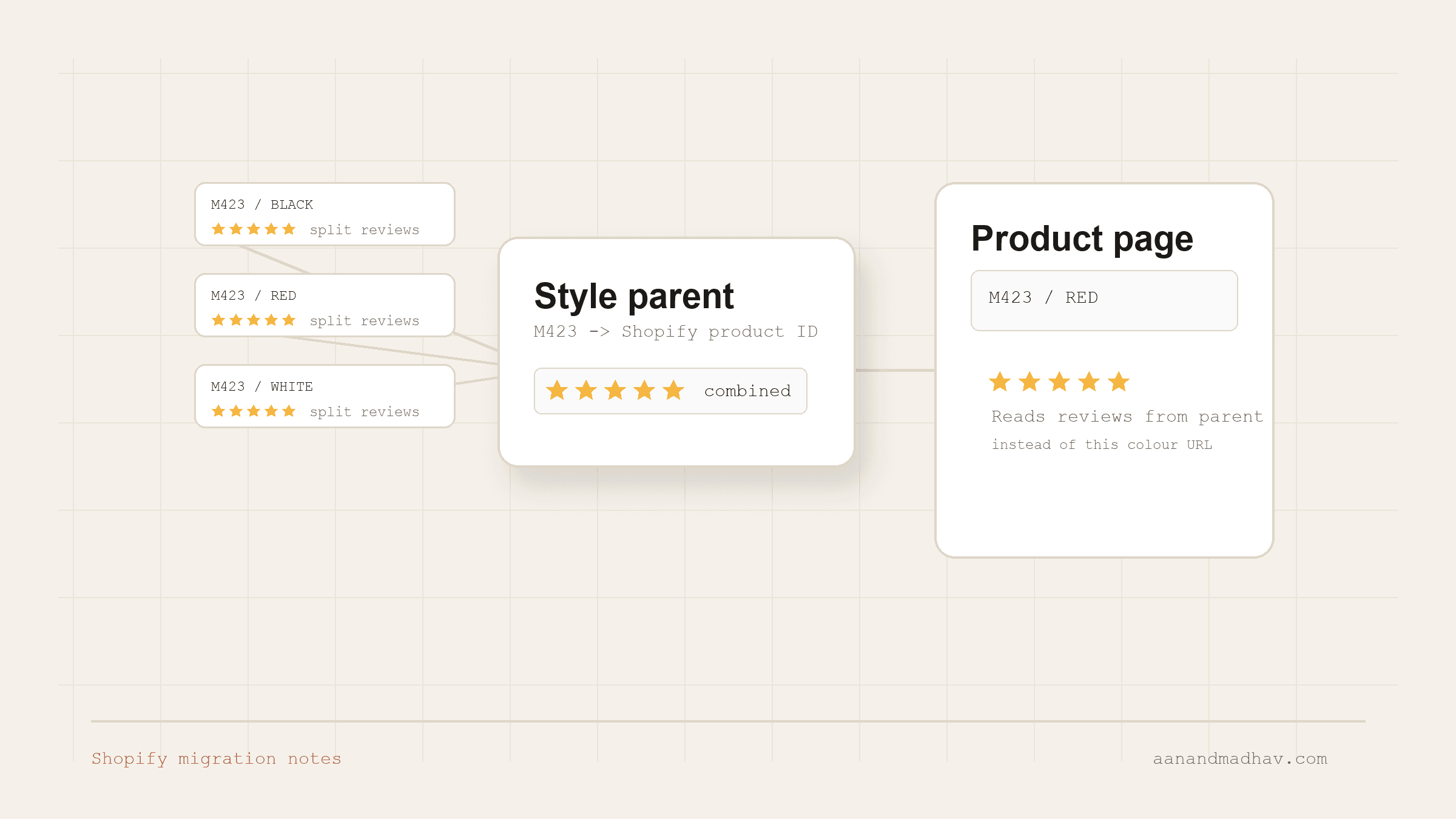
If I could not group products inside Judge.me for this migration, I could group the reviews before they ever got there.
The plan had two halves:
- On import, consolidate every review onto one parent product per style code.
- On the storefront, make every colour page and collection card read reviews from its style-code parent instead of from itself.
Parent product picked, reviews piled onto it, theme pointed at it. That is the whole trick. The rest is execution.
This is the same pattern I keep running into on WordPress and Shopify work: if a platform feature is mostly data mapping plus a small piece of code, there is often a layer you already control. I used the same thinking when I wrote about persisting UTM parameters without a WordPress plugin and when I built a self-hosted cookie consent plugin with an AI agent.
Step 1: Pick a Parent for Every Style Code
Every style code needed one canonical product to hold its reviews. I picked the parent by Shopify product ID and built a map:
M423 -> 8691234567890
M303 -> 8691234567891
F1702 -> 8691234567892
...
Reviews collected across m423-black, m423-red, and m423-white all got rewritten to sit on the one parent product ID for M423.
Step 2: Rebuild the Import File
This was the heavy lifting. I took the Vitals export and rewrote every row so its product_id pointed at the style-code parent, not the original colour product.
The result:
- 2,600+ reviews consolidated onto their code parents, each row carrying a real Shopify product ID.
- 347 reviews had
unknownhandles and could not match any product.
Instead of dropping the unknown-handle reviews, I blanked their product ID, handle, and URL so Judge.me imported them as store reviews. They still show up in the All Reviews page and review carousel. Nothing useful was thrown away.
One hard-won detail: I pulled the product IDs without a Shopify connector. The Admin API connection was not available, so I fetched IDs through the storefront /products.json endpoint at 250 products per page, with a /products/{handle}.js fallback, then zipped them back into the import file.
When the admin door is locked, the storefront JSON can still be a useful read-only source.
Step 3: Point the Theme at the Parent
The import fixes history. The theme has to handle the live storefront so every colour page renders the parent's reviews.
The theme does three things on every product page:
- Parses the style code from the product handle.
- Looks up the parent for that code in a generated Liquid map.
- Renders the Judge.me widget and badge pointed at the parent, not at the colour product the customer is viewing.
The style-code parser reads the first token that looks like a letter followed by two or more digits, such as m423, f1702, or v88, then uppercases it. It also handles category-prefixed handles like tees-m303-... or set-m398-.... If there is no match, it falls back to the current product.
So the black page, the red page, and the white page all render the same review set. One shirt, one reputation.
The Cache Problem That Looked Like a Code Bug
This was the part that cost the most time.
I imported the reviews. They were published in the Judge.me admin. The storefront still showed 0.
I stared at correct data in the admin and empty badges on the live site. It felt like a theme bug. It was not.
The storefront was reading cached review data in Shopify metafields, not the freshly imported rows directly. Judge.me regenerates that storefront data asynchronously. So the admin can be correct while the storefront still shows stale review counts.
The badge and the widget can also update separately. At one point the full reviews widget showed reviews while the star badge under the title was still hidden. When the badge cache thinks a product has 0 reviews, it may render as display:none, which can make a cache issue look like broken Liquid.
The fix was operational, not clever: ask Judge.me support to clear the cache and regenerate the widget data and product metafields. Once I stopped debugging code that was already correct and treated it as a cache problem, the reviews appeared.
A few more details that are worth knowing:
- Judge.me imports can add rows again if you re-import the same file. Delete or reconcile existing reviews before importing a corrected master file.
- Excel and Google Sheets can damage long Shopify product IDs by converting them into scientific notation. Upload the raw CSV and inspect it in a plain text editor when IDs matter.
- Fresh Judge.me installs can have a product sync lag on large catalogs. If matching fails on a large product set, wait for indexing or ask support to force a product sync before importing.
The Outcome
Every colour page now shows the full combined review count for its style code. The black shirt, the red shirt, and the white shirt all carry the same social proof instead of splitting it three ways.
- 450+ style codes consolidated.
- 2,600+ reviews merged onto parent products.
- 347 unmatched reviews rescued as store reviews.
- Zero useful reviews lost in the migration.
- No Product Groups dependency for this specific migration.
The future-proof part matters too. Because the reviews already sit on parent products, if the client later decides to use Product Groups, they can remove the theme snippets and let the grouping feature inherit the consolidated review base.
The Takeaway
When a platform feature is outside the scope of a migration, look at where that feature actually does its work.
In this case, product grouping was fundamentally about deciding which product a review should be read from. I moved that work to two layers I already controlled: the import file and the Shopify theme.
Many feature constraints are really questions about where the work should happen. Reviews are just rows with a product ID on them. Change the ID carefully, point the theme at the right product, and the storefront changes downstream.
If you are running a store where variants live as separate products, and reviews are getting split across them, this pattern can pull them back together.
Senior PM and UX Expert with 9 years of experience shipping products across fintech, ed-tech, ecommerce, and government sectors. Leads UX and development at YAMU Media and runs MediaMen Services.
Get in touch →