
Your Pixels Are Firing. Your Campaigns Still Show Zero. Here's Why.
Why Meta Pixel events can fire successfully but still show zero campaign conversions, with fixes for field mapping, custom conversions, CAPI, and deduplication.
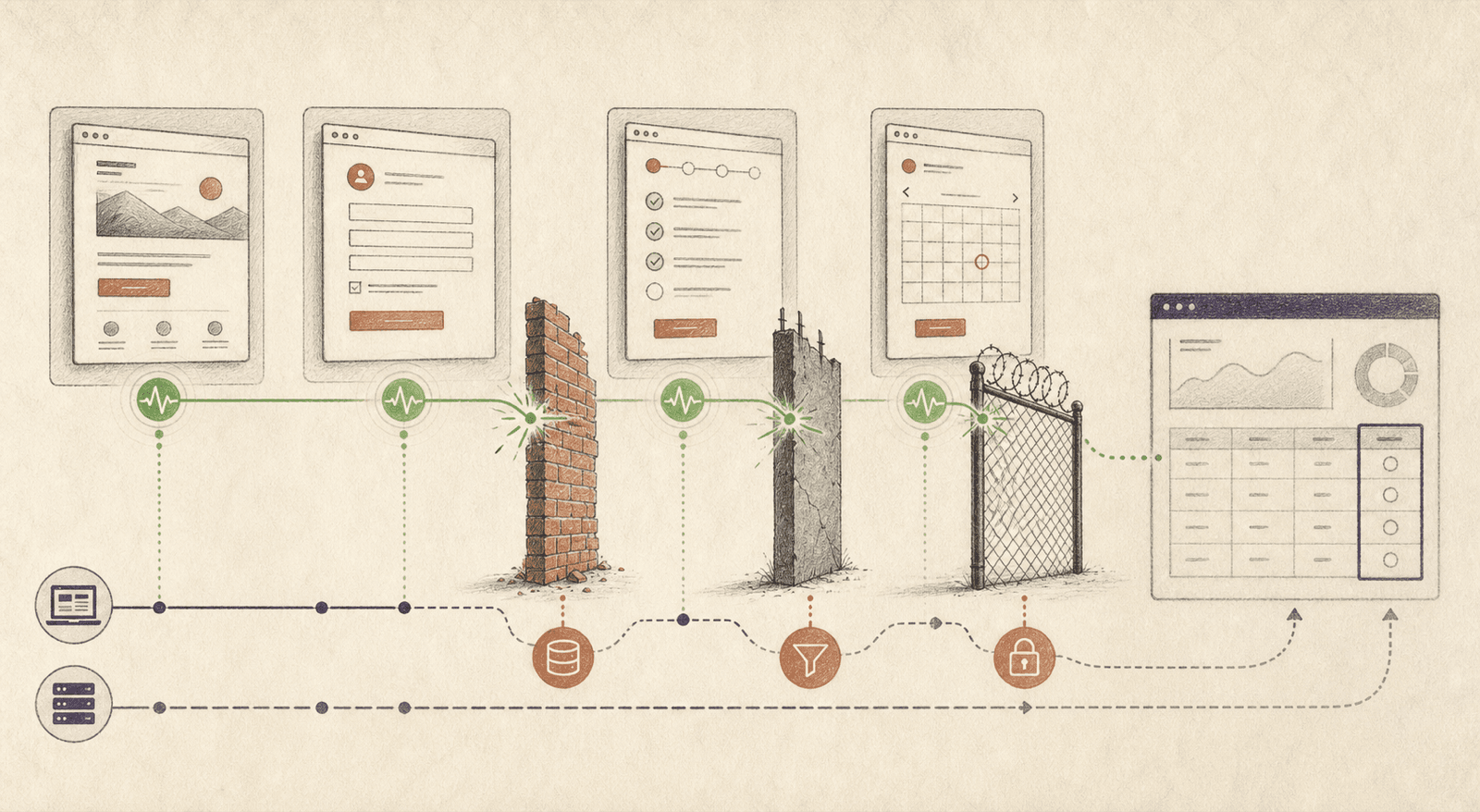
Picture this. You've built a clean paid funnel. Ads on top, a landing page, a qualification form, a booking calendar. You drop your Meta Pixel on every page, fire a custom event at each step, and open Events Manager expecting a beautiful trail of conversions.
The events are firing. Test Events shows them turning green in real time.
And your campaigns? Zero conversions attributed.
I lost a good chunk of a week to this exact problem on a multi-step lead funnel. The pixel was healthy. The events were real. Meta just refused to tie any of them back to an ad. This is the story of the three walls I hit, and the code that got me through each one.
Let's get into it.
The Setup (The Strategy in Plain English)
Before the problems, here's the shape of the funnel so the rest makes sense.
- Ads drive traffic to a landing page.
- The landing page (built on Unbounce) captures name, email, phone.
- On submit, the user is pushed to a qualification page (built on HubSpot) with a few budget-and-intent questions.
- Based on their answers, they either see a booking calendar or get sent to a nurture page.
- Everything flows into HubSpot for scoring and email automation.
Two platforms, four page transitions, one pixel that needs to follow the user the whole way and report back to Meta at each stage. Simple on a whiteboard. A minefield in production.
The goal was one thing: fire a clean, attributable pixel event at every meaningful step so the ad account could optimize on real qualified leads, not just clicks.
Here's where it went sideways.
Wall 1: The Landing Page Wasn't Passing Variables to the Next Page
The first funnel step lived on Unbounce. It captured the lead, then redirected to the HubSpot qualification page.
The plan was straightforward: pass firstname, lastname, email, and phone as URL query params so the forms on the following pages - including the meeting calendar form - could prefill those details, and so the pixel could hash that data for matching. If a later form does not need the personal information for prefilling, you can skip passing it and carry only the attribution variables you actually need.
The symptom: HubSpot was silently receiving nothing. Contacts showed up with blank fields. No error. No warning. Just empty.
The root cause: the two platforms disagreed on field names. Unbounce was sending first_name, last_name, phone_number. HubSpot expected firstname, lastname, phone. Because the fields were non-mandatory, nothing broke loudly. It just failed quietly, which is the worst kind of failure.
The fix was two-part:
- Rename the fields on Unbounce so the names match exactly what HubSpot expects.
- Remap the Unbounce-to-HubSpot integration by hand. This is the part people miss: renaming a form field does not automatically update the integration mapping. The mapping is a separate config, and it keeps pointing at the old names until you go fix it.
One more gotcha here. The phone field used a country-code picker defaulting to the wrong country. If the query-param prefill worked, the number populated correctly. If it failed for any reason, users saw the wrong country code. So I locked the validation to enforce the right prefix instead of trusting the default.
Lesson: when two platforms talk over URL params, field names are a contract. Break the contract silently and you'll debug ghosts for hours.
Wall 2: The Form Wouldn't Carry My Hidden Variables Forward
Wall 1 fixed the basic contact fields. But I needed more than name and email to travel through the funnel. I needed UTMs, a lead-source tag, click IDs, all the stuff that lets you actually attribute a conversion later.
The clean way to do this sounds like hidden fields. You add hidden fields to the form, populate them, and let the form carry them to the next page on submit.
Except it wasn't working. The hidden fields either weren't populating, weren't submitting, or weren't showing up in the redirect. I tried a dozen configurations. Nothing carried through reliably.
Here's the distinction that finally made it work.
I stopped setting the fields as "hidden" inside the HubSpot form builder. I created them as normal fields, then hid them visually with CSS.
The HubSpot form builder was doing something opinionated with fields configured as hidden, which caused them to be dropped from the submission or redirect. A normal field behaved predictably: it populated, submitted, and appeared in the query string. Setting the field's container to display: none was enough to keep it invisible to the user while leaving it fully available to the form engine.
That's it. The field submits, its value rides along in the redirect URL, and the next page can read it. Sometimes the "correct" abstraction (a hidden field) fights you, and the honest hack (a visible field you hide) is the thing that ships.
How to capture and pass a variable, start to finish:
- Add the variable as a real field in the form builder. Not a hidden one. A real one.
- In the form builder's own code/settings, populate it (from a URL param, a cookie, or a script).
- Hide it visually with
display: nonein CSS. - On submit, read it on the next page from the query string.
Reading it on the other side is trivial:
// On the destination page
const params = new URLSearchParams(window.location.search);
const leadSource = params.get('lead_source');   // e.g. "six-figures-ad"
const utmCampaign = params.get('utm_campaign');  // e.g. "evergreen-q3"

// Now these are yours to use - for prefill, for the pixel, for anything.
Now every variable I cared about was flowing through the whole funnel. Which brought me to the wall that actually cost me the most time.
Wall 3: The Pixels Fire, But Nothing Attributes to Campaigns
This was the big one.
Every event was firing. PageView, my custom form-submit event, my qualified-lead event, my call-booked event. Test Events lit up green. The pixel's health was fine. Advanced Matching was on.
And the campaigns showed zero conversions.
I burned real hours here assuming it was a matching problem, or a deduplication problem, or a consent problem. It was none of those.
The root cause in my setup: the custom events were firing, but I had not created the Custom Conversions my campaigns needed.
When you fire a standard event like Lead or Schedule, Meta already understands the action. A custom event such as trackCustom('my_qualified_lead') can still appear correctly in Test Events without being configured as the conversion action your campaign reports or optimizes against. In my case, creating a Custom Conversion pointing at that event was the missing step.
The moment I created a Custom Conversion for my custom event in Events Manager, the campaign started attributing. Same event. Same code. The only thing that changed was that one config object existed.
If you take one thing from this entire post, take this:
If your custom event is firing but campaign reporting stays empty, check whether the campaign needs a Custom Conversion for that event. That was the fix in my case.
That was the unlock. But I wasn't done, because I wanted this to be bulletproof, not just working.
Making It Bulletproof: Fire Every Event Twice
A pixel that lives only in the browser is fragile. Ad blockers, iOS privacy, dropped tabs, flaky networks. Any of them can eat your event and you'll never know.
So I ran the strategy two ways at once, and let them reinforce each other.
Way 1 - Frontend (the browser). A prime-time script on the page captures events from the forms, the calendar, and user actions, then pushes them into the data layer so the pixel fires. This is your fast, real-time signal.
// Frontend: hash PII in the browser, init the pixel with user data,
// then push the event. Fast, real-time, but blockable.
(async function () {
  async function sha256(val) {
    if (!val) return undefined;
    const buf = await crypto.subtle.digest(
      'SHA-256',
      new TextEncoder().encode(val.trim().toLowerCase())
    );
    return Array.from(new Uint8Array(buf))
      .map(b => b.toString(16).padStart(2, '0'))
      .join('');
  }

  function normalizePhone(val) {
    if (!val) return undefined;
    // Meta expects digits only, including the country code.
    return val.replace(/\D/g, '');
  }

  const params = new URLSearchParams(window.location.search);
  if (params.get('referrer') !== 'FORMS') return; // only fire post-submit

  const em = await sha256(params.get('email'));
  const ph = await sha256(normalizePhone(params.get('phone')));

  fbq('init', 'YOUR_PIXEL_ID', { em, ph });

  window.dataLayer = window.dataLayer || [];
  window.dataLayer.push({ event: 'my_qualify_form_submit' });
})();
Way 2 - Backend (the server). In HubSpot, I built workflows that fire the exact same events straight to Meta's Conversions API from the server. No browser involved. An ad blocker can't touch this one.
// Backend: same event, sent server-to-server via the Conversions API.
// Nothing in the browser can block this.
const axios = require('axios');
const crypto = require('crypto');

exports.main = async (event, callback) => {
  const { email, phone, utm_campaign } = event.inputFields;
  const normalizePhone = v => v ? v.replace(/\D/g, '') : undefined; // include country code
  const hash = v =>
    v ? crypto.createHash('sha256').update(v.trim().toLowerCase()).digest('hex') : undefined;

  const payload = {
    data: [{
      event_name: 'my_qualify_form_submit', // SAME name as the frontend
      event_time: Math.floor(Date.now() / 1000),
      action_source: 'website',
      event_source_url: 'https://your-funnel-page.example.com',
      user_data: { em: hash(email), ph: hash(normalizePhone(phone)) },
      custom_data: { utm_campaign: utm_campaign || undefined },
    }],
  };

  try {
    const res = await axios.post(
      'https://graph.facebook.com/v19.0/YOUR_PIXEL_ID/events', // use the latest supported API version
      payload,
      { params: { access_token: process.env.META_ACCESS_TOKEN } }
    );
    callback({ outputFields: { result: `ok - received: ${res.data.events_received}` } });
  } catch (err) {
    callback({ outputFields: { result: `error - ${err.response?.data?.error?.message || err.message}` } });
  }
};
Frontend gives you speed. Backend gives you reliability. Run both and your accuracy and campaign mapping jump.
One caveat if you do this: when both sources fire the same event, send a matching event_id on each so Meta can deduplicate them. Otherwise you'll double-count. Fire the same event, tag it with the same ID from both sides, and Meta collapses them into one.
The Part Nobody Tells You: The Form Events Are Hidden
Quick real-talk, because this ate an afternoon too.
To capture and send variables accurately in the pixel, you have to add those variables in the form builder and pass them in the code inside that same form builder. You can't bolt it on from the outside and hope.
And the form's own events - submit, step-complete, booking-confirmed - are often not exposed to you directly. My first assumption was that there'd be a clean callback. There wasn't. The events existed, they just weren't documented or surfaced in the obvious place.
So I dug. I inspected the live page, watched what the embed was actually broadcasting, and found the real event. In my case the booking confirmation came through as a postMessage from the calendar embed, not any documented hook:
// The booking event was never in the docs.
// It was a postMessage the embed was quietly broadcasting the whole time.
window.addEventListener('message', function (event) {
  if (event.data && event.data.meetingBookSucceeded === true) {
    window.dataLayer = window.dataLayer || [];
    window.dataLayer.push({ event: 'my_call_booked' });
  }
});
The point isn't this specific line. The point is: if the event you need isn't handed to you, it's usually still there. Inspect the page, watch the messages, read the network tab. The final, working code almost always comes from digging past the docs, not from the docs.
Final Thoughts
Attribution failures are rarely one big bug. Mine was three quiet ones stacked on top of each other:
- Field names are a contract. Break them between two platforms and data vanishes silently.
- HubSpot's hidden-field setting can betray you. A normal field hidden with
display: nonecan be more reliable than a field configured as hidden inside the form builder. - Event receipt and campaign configuration are separate. In my case, creating a Custom Conversion was the step that made the custom event appear in campaign reporting.
And once it works, don't trust a single browser-side pixel. Fire every event twice, frontend and backend, dedupe with an event_id, and sleep better knowing an ad blocker can't quietly delete your conversions.
The events were always firing. The whole job was teaching Meta to listen.
Fighting a funnel that fires events but won't attribute them? That's exactly the kind of mess I like untangling. Let's talk →
Senior PM and UX Expert with 9 years of experience shipping products across fintech, ed-tech, ecommerce, and government sectors. Leads UX and development at YAMU Media and runs MediaMen Services.
Get in touch →