
How I Built a Food Ordering System That Ends in a WhatsApp Message
How I built a WordPress food ordering experience that turns a 170-dish cart into a structured WhatsApp message without adding checkout or a new order backend.
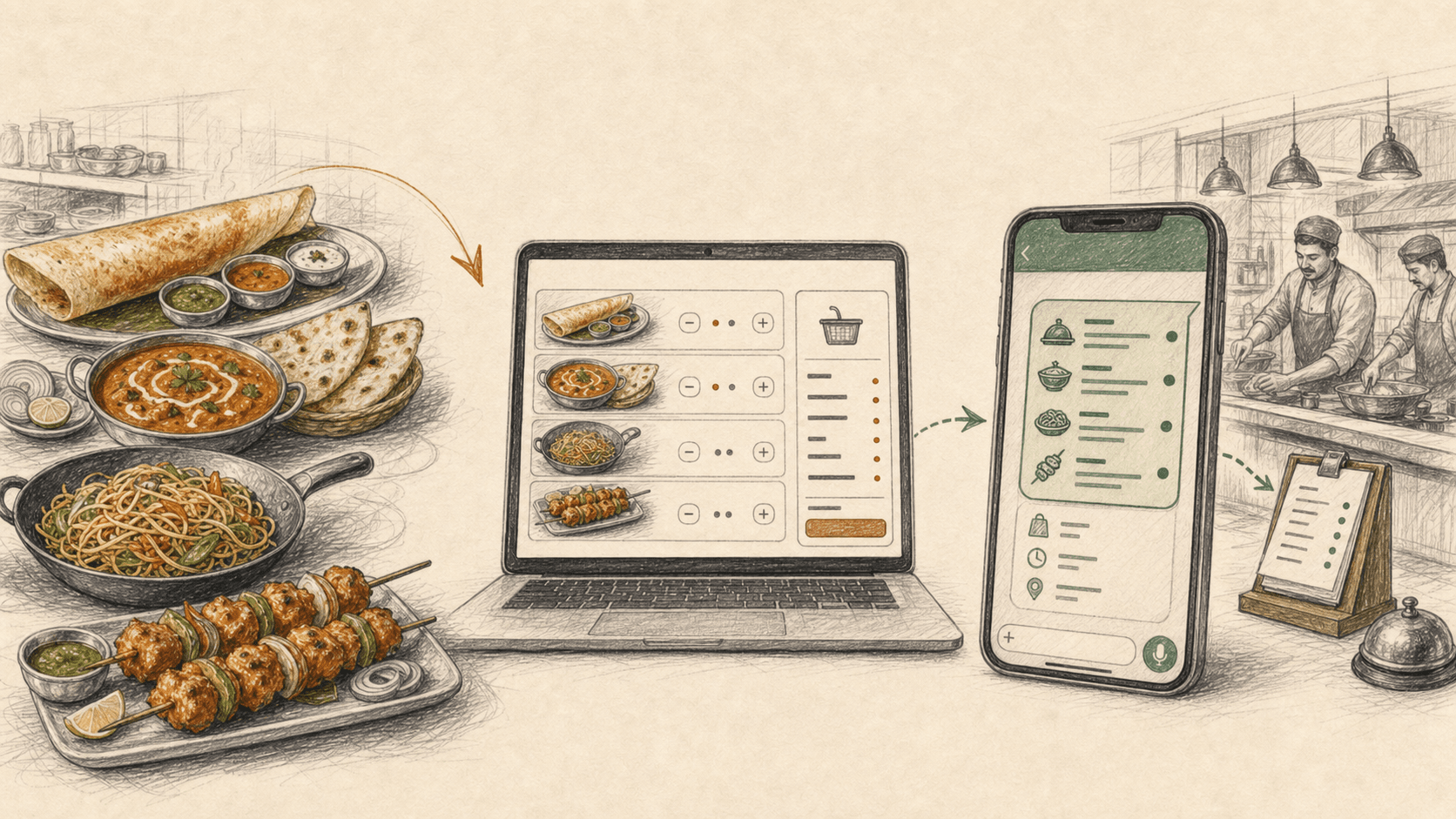
South Zone is a multi-cuisine restaurant in Laxmi Nagar, East Delhi. South Indian, North Indian, Chinese and Tandoor under one roof. 170 dishes on the menu.
When I built their website, the obvious move was an online ordering system. Cart, checkout, payment gateway, order dashboard. The full stack.
I built the cart. I skipped everything after it.
When a customer taps Send order on WhatsApp, the site opens WhatsApp with a pre-filled message containing every item, the quantities, the prices, the subtotal and the customer's details. The customer hits send. The restaurant gets the order in the same WhatsApp inbox they already check all day.
That is the whole system. Here is why I think it was the right call, and how it works.
The Constraint Nobody Designs For
The South Zone team takes orders on WhatsApp and phone calls. That is their workflow. It works for them.
They were never going to log into a dashboard, manage order statuses, or learn a POS. Not because they are not capable, but because they are busy running a kitchen. Every new tool I hand them is a tool they have to remember, maintain and not break.
Most web projects treat this as a problem to fix. Get the client onto the "proper" system. Train them. Watch the system quietly die three weeks later because nobody checked the dashboard.
I treated it as a requirement instead.
The Reframe
Here is the thing: the ordering bottleneck was never on the restaurant's side. Their WhatsApp intake works fine.
The bottleneck was on the customer's side. Try dictating an order from a 170-dish menu over a phone call. Or typing it out item by item in a chat, guessing at prices, asking whether the Chilly Paneer is dry or gravy.
So the job was not "digitise the restaurant's workflow". The job was:
💡 Digitise the customer's experience of the workflow, and leave the workflow alone.
The customer gets a real ordering experience. Browse by cuisine, pick variants like half/full or dry/gravy, add to cart, see a running total. The core browsing and cart interactions they expect from Swiggy or Zomato.
The restaurant gets what they already had: a WhatsApp message. Just a much better one.
How It Works
The site is WordPress with Elementor. Dishes live in a custom post type with per-item settings for cuisine, section, price, variants, badges and sold-out state. The cart is plain JavaScript with localStorage. No accounts, no sessions, no backend orders table.
The interesting part is the last step. Instead of a checkout, the cart builds a structured message:
function buildMessage() {
  var lines = cart.map(function (i) {
    return i.qty + "x " + i.key + " - " + money(i.price * i.qty);
  });
  var sub = subtotal(), free = sub >= CFG.freeDeliveryMin;
  var deliveryLine = orderType === "Delivery"
    ? (free ? "Delivery: FREE (₹400+)" : "Delivery charge: to be confirmed")
    : "Pickup: Takeaway";
  var who = [
    "Name: " + (details.name || ""),
    orderType === "Delivery"
      ? "Address: " + (details.address || "")
      : "Pickup time: " + (details.time || ""),
    "Phone: " + (details.phone || ""),
  ];
  return ["*New Order - South Zone*", "Order type: " + orderType, "--------------------"]
    .concat(lines, ["--------------------", "*Subtotal: " + money(sub) + "*", deliveryLine, ""], who)
    .join("\n");
}

function sendOrder() {
  if (!cart.length) return;
  window.open("https://wa.me/" + CFG.waNumber + "?text=" + encodeURIComponent(buildMessage()), "_blank");
}
The wa.me link with an encodeURIComponent-ed text parameter is the entire "integration". No API keys, no WhatsApp Business API approval, no webhooks. The number in CFG.waNumber has to use international format with digits only: no +, spaces or punctuation.
The same URL carries the customer's name, address and phone number so WhatsApp can prefill the order. I use those details only for that handoff and avoid capturing the full outbound URL in analytics or server logs.
The message that lands in the restaurant's chat looks like this:
*New Order - South Zone*
Order type: Delivery
--------------------
2x Masala Dosa - ₹260
1x Chilly Paneer (Gravy) - ₹200
--------------------
*Subtotal: ₹460*
Delivery: FREE (₹400+)

Name: Rahul
Address: B-12, Laxmi Nagar
Phone: 98XXXXXXXX
Compare that to the usual "hi is masala dosa available, what is the price" back-and-forth. The restaurant reads one message and starts cooking.
A few small UX details carried a lot of weight:
- Order type toggle - Delivery or Takeaway, and the form asks for an address or a pickup time accordingly.
- Free delivery nudge - the cart shows "FREE delivery on ₹400+" against the running subtotal, which quietly pushes order values up.
- Variants in the cart line - half/full and dry/gravy are part of the item key, so the restaurant never has to ask a follow-up question.
- The cart survives - localStorage means a customer who gets distracted and comes back an hour later still has their bag.
What the Restaurant Got By Not Having a Checkout
This is the part I want other developers and agency folks to sit with.
✔ Zero new tools. Orders arrive where they already look: WhatsApp. ✔ Zero payment gateway costs. No transaction fees, settlement delays or payment gateway compliance workflow. ✔ Zero dedicated ordering backend. No separate order infrastructure to maintain on a Saturday night. ✔ A human in the loop by default. They confirm availability and delivery charges in the same chat, which is exactly how they handle edge cases anyway.
And the customer got a browsing and ordering experience that did not exist before, for a restaurant that was previously "call us or scroll our Zomato page".
Where This Pattern Breaks
I am not selling this as the answer for everyone. It is the answer for a specific shape of business.
It breaks when:
- Volume is high. Fifty orders an hour through a chat inbox is chaos. This works at neighbourhood-restaurant scale.
- You need payment upfront. There is no capture step. If no-shows and fake orders are a real cost, you need a gateway.
- The order is not really placed until they hit send. The customer can build a cart, open WhatsApp, and bail. You can measure the handoff click, but you lose visibility after it and cannot confirm that the message was sent.
- You need order history and reporting. The "database" is a chat thread.
If any of those describe the business, build the real thing. But be honest about whether they do, or whether you are just defaulting to the full stack because it is what a "serious" ordering system looks like.
The Takeaway
The best ordering system for South Zone was the one they already had. My job was to put a better interface in front of it.
Meet clients at their operational maturity. A system the team actually uses beats a more capable system they abandon. Sometimes the most senior engineering decision on a project is the checkout you refuse to build.
Running a food business and want an ordering experience without the POS overhead?
Senior PM and UX Expert with 9 years of experience shipping products across fintech, ed-tech, ecommerce, and government sectors. Leads UX and development at YAMU Media and runs MediaMen Services.
Get in touch →